Sunday, 25 March 2018

SQL Training - 08


DENSE_RANK, With

DENSE_RANK: Returns the rank of rows within the partition of a result set, without any gaps in the ranking
With :Specifies a temporary named result set


With R as
(select salary, DENSE_RANK() over (order by salary desc) as SalaryRank
from Employees
)
select salary from R where R.SalaryRank=1


with Ties
Used when you want to return two or more rows that tie for last place in the limited results set
Like Tawjihi Results,,
select top 10 with Ties *

from employees
order by salary


 Trigger 
Level 1: on Database Level
new query window and type the following  
Create trigger [tr_createTable]
on Database
for Create_Table, Alter_Table, Drop_Table, Table_Rename
as
begin
 rollback
 Print 'you are prohibited from  create, alter, drop, rename a table'
end

GO

ENABLE TRIGGER [tr_createTable] ON DATABASE
DROP TRIGGER [tr_createTable] ON DATABASE

Level 2: on Table Level

You can use one of the following to insert in Audit via trigger 
1-
Create trigger [dbo].[tr_employeeInsert]
on [dbo].[Employees]
for Insert
as
begin
 Declare @Id int
 Declare @Name varchar(50)
 Declare @Salary float

 select @Id= id, @Name=_name, @Salary=salary
 from inserted

 Insert into Employees_Audit values(@id,@name, @Salary, GETDATE());
end

2-

Create trigger [dbo].[tr_employeeInsert]
on [dbo].[Employees]
for Insert
as
begin
 Insert into Employees_Audit
 select id, _name, salary, GETDATE()
 from Inserted;
end


You can use one of the following to insert in Audit via trigger  and prevent insert using condition 

ALTER trigger [dbo].[tr_employeeInsert]
on [dbo].[Employees]
for Insert
as
begin
 Declare @Id int
 Declare @Name varchar(50)
 Declare @Salary float

 select @Id= id, @Name=_name, @Salary=salary
 from inserted

 if(@Salary=0)
 begin
  RaisError('Invalid salary', 16, 1)
  rollback
  return
 end
 Insert into Employees_Audit values(@id,@name, @Salary, GETDATE(),'Insert');


end


L To insert from view

use instead of insert to override SQL default insert statement
create view [dbo].[vu_emp] as
SELECT        Employees.id as empid, Employees._name, Employees.salary, depts.dept
FROM            Employees inner JOIN

                         depts on Employees.deptid= depts.deptid


create TRIGGER [dbo].[tr_inseadofinsert]
   ON  [dbo].[vu_emp]
   instead of insert
AS
BEGIN
       declare @deptid  int
       select @deptid=depts.deptid
       from depts inner join inserted on depts.dept=inserted.dept

       Insert into Employees
       select _name, salary, @deptid
       from inserted

END

Level 3: on Server Level
instead
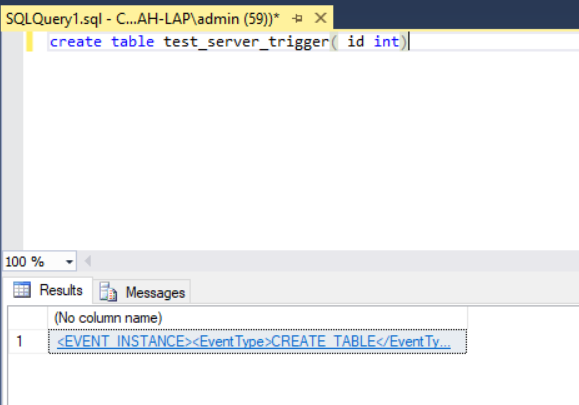
create trigger tr_serverlevel
on all server
for create_table
as
begin
select  EventData()
end


after clicking on the result link it will open in xml format contains the following


<EVENT_INSTANCE>
  <EventType>CREATE_TABLE</EventType>
  <PostTime>2018-03-29T08:51:39.217</PostTime>
  <SPID>59</SPID>
  <ServerName>CI....</ServerName>
  <LoginName>MicrosoftAccount\moh...</LoginName>
  <UserName>dbo</UserName>
  <DatabaseName>Person</DatabaseName>
  <SchemaName>dbo</SchemaName>
  <ObjectName>test_server_trigger</ObjectName>
  <ObjectType>TABLE</ObjectType>
  <TSQLCommand>
    <SetOptions ANSI_NULLS="ON" ANSI_NULL_DEFAULT="ON" ANSI_PADDING="ON" QUOTED_IDENTIFIER="ON" ENCRYPTED="FALSE" />
    <CommandText>create table test_server_trigger( id int)</CommandText>
  </TSQLCommand>
</EVENT_INSTANCE>

No lock and tran
select * from Employees with (nolock)

begin tran
       update Employees set salary=2000
       where id=2

       update Person
       set FName='A-A'
       where Id=136
commit tran


Sunday, 18 March 2018

SQL Training - 07


Create function

CREATE FUNCTION GetAge
(
-- Add the parameters for the function here
@DoB as datetime
)
RETURNS int
AS
begin

declare @Age int
select @Age = DATEDIFF(day, @DoB, getdate())
Return @Age
end

to use the function do as the following
select [dbo].[GetAge](convert(date,'19870516'))


Create Stored Procedure

why to use?

  • Compiled 
  • parsed 
  • Security (You don't see the table)

CREATE PROCEDURE getPersonData
-- Add the parameters for the stored procedure here
@id as int
AS
BEGIN
-- SET NOCOUNT ON added to prevent extra result sets from
-- interfering with SELECT statements.
SET NOCOUNT ON;

    -- Insert statements for procedure here
select * from Person
where id=@id
END
GO

[dbo].[getPersonData] 360
or exec [dbo].[getPersonData] 360 


Create delete trigger 

CREATE TRIGGER logDeleteTransact
   ON [dbo].[Person]
  for delete
AS 
BEGIN
-- SET NOCOUNT ON added to prevent extra result sets from
-- interfering with SELECT statements.
SET NOCOUNT ON;

    -- Insert statements for trigger here
insert into deleted_person(ID, fName, LName)
select deleted.ID, deleted.fName, deleted.LName from deleted
END
GO


SQL Training - 06


create Partition Function fnDOB(DateTime)
AS Range LEFT 
for values ('20091231','20101231','20111231','20121231')


create partition scheme schDOB as partition fnDOB
to(D_LT2010, D_2010, D_2011, D_2012, D_GT2012)


If you use partitioning in your DB, we recommend to use field not change periodically 


Fetch

select * from Person
order by Id
OFFSET 10 ROWS
FETCH NEXT 10 ROWS ONLY

Row Number

SELECT top 10 *
FROM    (
        SELECT  *, ROW_NUMBER() OVER (ORDER BY id) AS rn
        FROM    Person
        ) p
WHERE   rn > 0
ORDER BY  id

Create table from select

Select * into new_table  from  old_table 

Logging Delete records in another table

delete from Person_Old 
output deleted.id, deleted.FName, deleted.LName
Into deleted_person(ID, fName, LName)
where ID=350


DateDiff the date different 
select  DATEDIFF(day,'19870516',getdate())/365.24 as age


End of month 
select  EOMONTH(getdate())

Check if date or not(1,0)

select  isdate(getdate())


Concatenate and Convert

select top 10 'Name: '+ fname +'  '+lname +', DOB= '+convert(nvarchar, dob) + '  Gender: '+
case
when Gender=1
then 'Male'
when Gender=0
then 'Female'
end
as userDesc
from Person


Sunday, 11 March 2018

Sum Data in Tables

SELECT
    t.NAME AS TableName,
    i.name as indexName,
    sum(p.rows) as RowCounts,
    sum(a.total_pages) as TotalPages,
    sum(a.used_pages) as UsedPages,
    sum(a.data_pages) as DataPages,
    (sum(a.total_pages) * 8) / 1024 as TotalSpaceMB,
    (sum(a.used_pages) * 8) / 1024 as UsedSpaceMB,
    (sum(a.data_pages) * 8) / 1024 as DataSpaceMB
FROM
    sys.tables t
INNER JOIN     
    sys.indexes i ON t.OBJECT_ID = i.object_id
INNER JOIN
    sys.partitions p ON i.object_id = p.OBJECT_ID AND i.index_id = p.index_id
INNER JOIN
    sys.allocation_units a ON p.partition_id = a.container_id
WHERE
    t.NAME NOT LIKE 'dt%' AND
    i.OBJECT_ID > 255 AND 
    i.index_id <= 1
GROUP BY
    t.NAME, i.object_id, i.index_id, i.name
ORDER BY
    DataSpaceMB desc

SQL Training - 05

Clustered and Non-Clustered Indexes:

  • Each table can have one Clustered Index and many columns in this clustered Index.
  • Each page can have 8.1KB
  • When you add more than one column in the clustered the pages will increase and the access time will increase.
  • Recommended to Add a clustered indexes on each table.
  • You can remove the primary key from the clustered index and add any other columns.
  • Each primary key is a clustered index and a clustered could contains non-primary key.
  • Each table doesn't have a clustered index called heap.
  • Phone book is clustered; the pages already contains the data.
  • Non-clustered index is pointer; like book Index.

Sunday, 4 March 2018

SQL Training - 04


  • after 255 hit at the same time it will be put in the queue
  • Data loss in simple backup is very high
  • Unique key may allow null
  • De-normalization: using joining 
  • Don't delete cascade
  • Cluster Indexing: Like Phone book (restructuring pages)
  • Non Clustered Indexing: Like Book Index (فهرس الكتاب)(no restructuring for the pages just create index for the newly pages or edited pages)

--select [name], recovery_model_desc from sys.databases;

--alter database one set recovery simple;

--backup log one to disk = N'c:\tmp\one.trn';
--backup database one to disk = N'c:\temp\one.bak';
--alter database one set recovery full;
backup log one to disk = N'c:\temp\one.trn'; --you cannot make backup for log file before creating full backup
backup database one to disk  = N'c:\temp\one.bak';


Case Study: Fleet Management Systems
  • Main Entities
    • Car (Detailed Data on each vehicle)
    • Make(This is a description of all vehicle)
    • Shape(This contains the possible shapes)
    • Vendor(These are approved vendors which can be used to supply parts)
    • Maintenance (his data contains description of all the maintenance operations performed  )
    • Parts(This table represents parts that have been take out of inventory)