When I'm trying to open Android Layout File(Double Click on it), it opened as XML file, so, why?
The reason is android SDK sometime make the developer crazy with some bugs like this" Opening layout file as XML and design instead of Graphical Layout"
The solution is:
Right Click on the Layout file -> Open with -> Android Layout Editor
When I'm trying to open Android Layout File(Double Click on it), it opened as XML file, so, why?
The reason is android SDK sometime make the developer crazy with some bugs like this" Opening layout file as XML and design instead of Graphical Layout"
The solution is: Right Click on the Layout file -> Open with -> Android Layout Editor
I this is a popup dialog contains this error "Error within Debug UI: java.lang.reflect.InvocationTargetException", I googled it, but I didn't found the solution.
I tried to delete the Project from the Projects Work space, and I reimported it, it worked fine.
so, the easiest solution is "Delete the Project from the work space, Reimport it again to the work space"
The result: it will work 100%
10. Press on User Mapping, Pick the DB which you want this user to manage and select the memberships rules. look at the Figure bellow.
11. The Status Tab should be as the following Figure.
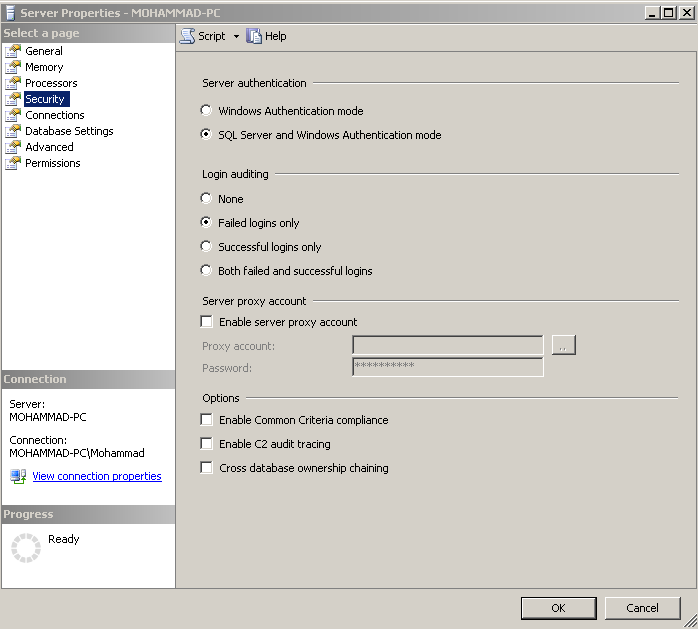
12. Press OK. 13. Right click on Server name -> Properties 14.Press on Security tap and Pick SQL server and windows authentication mode under Server Authentication section. Look @ the figure bellow