Thursday, 21 July 2011

Creat Servlet and Connect it to MS SQL server


1) Install Netbeans 6.9 or later
2) Download GlassFish from this site
install GlassFish, it will run easy
3) Run NetBeans IDE and view Services window 


Right Click on servers the click on "add server.."

Type instead of x the version of the GlassFish you want to add
the press Next and type the link of the GlassFish installation folder 
press Next and Select the domain and press Finish
** Now your GlassFish Created 

4) Now you have to start the server by right click on GlassFish 3.1 and click start 
if the server didn't  start the solution is bellow

5) Creating GlassFish Domain
open your  glass fish directory and open bin folder 
double click on "asadmin" it will run and type "domain" then an error list will shown like the figure bellow 

never mind, just I want to show you how you can get correct commands 
now type "create-domain domain2" and wait for response 

back to netbeans and repeat step 3 but choose domain2 and run the server

---------------------------------------------
Now we want to configure MSSQL server
1) install SQL server 2005 or later
2) Create your DB with windows authentications 
3) Create new user with Sql authentications with password and select the DB to be shown to this user 
4) Go to DB and right Click and choose properties and press on Permissions and select the user and check all CheckBoxes under Grant Header like the figure bellow 

5) Now you want to know the port number on which the SQL server listen to
by doing like the two figures bellow

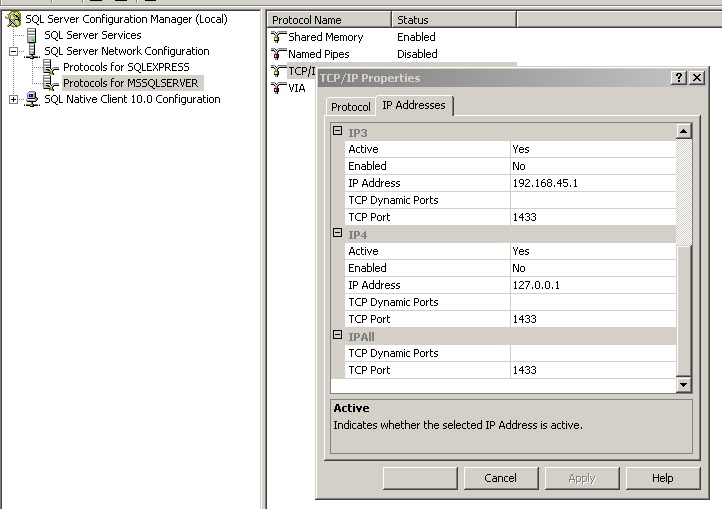
from the previous figure you can get the port.


-------------------------------------------
Now Creating Servlet 

1) Run Netbeans and press on "File" tab and press on "New Project" 
2) Select Java Web from Categories and Web Application from Projects
3) Type your project name and directory and the libraries directory 
4) Choose GlassFish and JEE 
5) Do like the figure bellow (let all of them empty)

Click finish, now you have a web project

*** Creating Servlet
on project name right click and select  new Servlet
Do like the bellow two figures 


Press finish and edit the 

Add the sql db driver into libraries 
downloadable from this site http://www.mediafire.com/?3ycmaelhoot

Look at the example bellow

import java.io.*;
import javax.servlet.*;
import javax.servlet.http.*;
import java.sql.*;
import javax.servlet.annotation.WebServlet;

/**
 *
 * @author Mohammad
 */
//this to call the servlet from an ip address
//http://ipaddress:port/defaultSite/ServletCallableName

@WebServlet(name = "ServletCallableName", urlPatterns = {"/ServletCallableName"})

public class NewServlet extends HttpServlet {

    private Connection conn;
    private PrintWriter printWriter;
    private StringBuffer stringBuffer;

    protected void processRequest(HttpServletRequest request, HttpServletResponse response)
            throws ServletException, IOException {

        String ua = request.getHeader("User-Agent");      

        stringBuffer = new StringBuffer();
       
            CallableStatement callableStatment = null;

            try {
                Class.forName("com.microsoft.sqlserver.jdbc.SQLServerDriver");
                conn = DriverManager.getConnection("jdbc:sqlserver://localhost:1433;"//1433 sql port look at    
//figures bellow
                        + "databaseName=WhoWantsToBeMillionaireQs;user=mohammad;password=moh");

                callableStatment = conn.prepareCall("{call get_rando_rows(?)}");//call get_rando_rows: procedure name created on Sql serve DB, takes one parameter, the procedure runs 3 select statments and returns 3 results as three tables 
                callableStatment.setString("Count", "5");//the procedure parameter 

                boolean isExecuted = callableStatment.execute();//to execute the query 

                int rsCount = 0;
                try {

                    do {
                        if (isExecuted) {
                            ResultSet rs = callableStatment.getResultSet();
                            rsCount++;

                            ResultSetMetaData rsmd = rs.getMetaData();
                            int numOfColumns = rsmd.getColumnCount();
                            while (rs.next()) {
                                for (int i = 1; i <= numOfColumns; i++) {
                                    stringBuffer.append(rs.getString(i));
                                    stringBuffer.append("|#|");
                                }
                            }
                            rs.close();
                            System.out.println();
                            isExecuted = callableStatment.getMoreResults();
                        }
                    } while (isExecuted);
                    callableStatment.close();
                } catch (Exception e) {
                    e.printStackTrace();
                }

            } catch (SQLException ex) {
                stringBuffer.append("  SQL Exception.  ");
                stringBuffer.append(ex.getMessage());
            } catch (ClassNotFoundException cex) {
                stringBuffer.append("  Class Not Found Exception  ");
                stringBuffer.append(cex.getMessage());
            } catch (Exception ex) {
                stringBuffer.append("Unknown Exception  ");
                stringBuffer.append(ex.getMessage());

            }
       
        response.setContentType("text/plain");
        printWriter = response.getWriter();
        printWriter.print(stringBuffer.toString());
        printWriter.close();

    }

    // <editor-fold defaultstate="collapsed" desc="HttpServlet methods. Click on the + sign on the left to edit the code.">
    /** 
     * Handles the HTTP <code>GET</code> method.
     * @param request servlet request
     * @param response servlet response
     * @throws ServletException if a servlet-specific error occurs
     * @throws IOException if an I/O error occurs
     */
    @Override
    protected void doGet(HttpServletRequest request, HttpServletResponse response)
            throws ServletException, IOException {
        processRequest(request, response);
    }

    /** 
     * Handles the HTTP <code>POST</code> method.
     * @param request servlet request
     * @param response servlet response
     * @throws ServletException if a servlet-specific error occurs
     * @throws IOException if an I/O error occurs
     */
    @Override
    protected void doPost(HttpServletRequest request, HttpServletResponse response)
            throws ServletException, IOException {
        processRequest(request, response);
    }

    /** 
     * Returns a short description of the servlet.
     * @return a String containing servlet description
     */
    @Override
    public String getServletInfo() {
        return "Short description";
    }// </editor-fold>
}


Mohammad Abu Hmead 
Palestine 
21.07.2011
01:43 AM

Sunday, 17 July 2011

Connection between Java and SQL Server

Hint: Use sqljdbc4.jar


package server;
import java.io.*;
import javax.servlet.*;
import javax.servlet.http.*;
import java.sql.*;
import javax.servlet.annotation.WebServlet;
/**
 *
 * @author Mohammad
 */
@WebServlet(name = "viewFromSQL", urlPatterns = {"/viewFromSQL"})
public class EmailConnectedtoSQLServer2008 extends HttpServlet {
Connection theConnection;
 private ServletConfig config;
 public void init(ServletConfig config)
  throws ServletException{
  this.config=config;
 }
    public void service (HttpServletRequest req, HttpServletResponse res)
      throws ServletException, IOException {
         
   HttpSession session = req.getSession(true);
   res.setContentType("text/html");
   PrintWriter out = res.getWriter();

        out.println("<HTML><HEAD><TITLE>Emai List.</TITLE>");
   out.println("</HEAD>");
   out.println("<BODY bgColor=blanchedalmond text=#008000 topMargin=0>");
        out.println("<P align=center><FONT face=Helvetica><FONT color=fuchsia style=\"BACKGROUND-COLOR: white\"><BIG><BIG>List of E-mail addresses.</BIG></BIG></FONT></P>");
   out.println("<P align=center>");
        out.println("<TABLE align=center border=1 cellPadding=1 cellSpacing=1 width=\"75%\">");
 
        out.println("<TR>");
        out.println("<TD>Name</TD>");
        out.println("<TD>E-mail</TD>");
        out.println("<TD>Website</TD></TR>");
 try{
            Class.forName("com.microsoft.sqlserver.jdbc.SQLServerDriver");//Loading Sun's JDBC ODBC Driver
            theConnection = DriverManager.getConnection("jdbc:sqlserver://localhost:1433;" +
         "databaseName=email;user=moh;password=123"); //Connect to emaildb Data source
            out.println("<br> DATABASE NAME IS:" 
                    + theConnection.getMetaData().getDatabaseProductName()+"</br>");
            Statement theStatement=theConnection.createStatement();
            ResultSet theResult=theStatement.executeQuery("SELECT * FROM emaillists"); //Select all records from emaillists table.
 
              while(theResult.next()) //Fetch all the records and print in table
  {
                   
     out.println();
       out.println("<TR>");
       out.println("<TD>" + theResult.getString(1) + "</TD>");
       out.println("<TD>" + theResult.getString(2) + "</TD>");
   String s=theResult.getString(3);
       out.println("<TD><a href=" + s + ">" + s + "</a></TD>");
       out.println("</TR>");

  }
            theResult.close();//Close the result set
            theStatement.close();//Close statement
            theConnection.close(); //Close database Connection
      }catch(Exception e){
  out.println(e.getMessage());//Print trapped error.
 }
 
       out.println("</TABLE></P>");
       out.println("<P>&nbsp;</P></FONT></BODY></HTML>");

 }
 public void destroy(){

 }
}

JAVA to MS Access Connection (JDBC-ODBC bridge)


Tuesday, 21 June 2011

Java Abstraction

Abstract class is a class that is declared abstract
*  it may or may not include abstract methods.
*  Abstract classes cannot be instantiated, but they can be subclassed.
*  If a class includes abstract methods, the class itself must be declared abstract.
* When an abstract class is subclassed, the subclass must have implementations for all of the 
   abstract  methods.
* When an abstract class inherited from an abstract class there is no need to 
  implement its super abstract methods


Abstract method is a method that is declared without an implementation:(without braces, and followed by a semicolon)
abstract void setUserName(String name);

Friday, 17 June 2011

Java Overloading

Overloading is the same method name with different parameters.
the Constructors can be overloaded
**Methods with Same name in The Class or its Subclasses with different Signature.
Signature (Parameters DataTypes or Number)ex
Class A{
public A(){....}
public A(int x){....}
public A(char x){....}
public void getSomeThing(){.....}
public void getSomeThing(char x){.....}
public void getSomeThing(String x,int y){.....}
public void getSomeThing(double x){.....}
}
Class B extends A{
public void getSomeThing(String x,char y){.....}
}
** You can pass float or double to method who's parameter datatype is double but contrary is prohibited


The overloaded methods can be static , final and or abstract.


Hint: Java uses method Parameters Types and count to specify which method.
Java doesn't differentiate between methods depending on there return DataType 


Hint: Use Overloading when you need multiple methods with different parameters, but methods do the same thing.
Don't use Overloading when methods do different tasks


For more info: http://www.java-samples.com/showtutorial.php?tutorialid=284


Thursday, 16 June 2011

Null returned when using findViewById


Hello,
sometime you have nullpointerexception when using findViewById like the code snippet bellow
                TextView tv=(TextView)findViewById(R.id.textViewVV);
if(tv!=null)
tv.setText("Not Null");
this is done because you call different of the set layout
the solution is to call views from the layout you use on the current Activity
like this

setContentView(R.layout.test);
TextView tv=(TextView)findViewById(R.id.textViewVV);
if(tv!=null)
tv.setText("Good");
textViewVV is in test layout, so, this code works fine.


Tuesday, 7 June 2011

Read file into byte array in j2me

import java.io.InputStream; import java.io.OutputStream; import javax.microedition.io.Connector; import javax.microedition.io.file.FileConnection; /**
 * This class to read file from memory and create a file on phone memory
 * @author Mohammad Abu Hmead
 * 08.03.11
 */
public class CreateAndReadFileOnAndFromMemory {

    public static final 
String FILE_LOCATIO_IN_PHOTOS=System.getProperty("fileconn.dir.photos");
    public static final 
String FILE_LOCATIO_IN_VIDEOS=System.getProperty("fileconn.dir.videos");
    public static final 
String FILE_LOCATIO_IN_TONES=System.getProperty("fileconn.dir.tones");
    public static final 
String FILE_LOCATIO_ON_MEMORY_CARD=System.getProperty("fileconn.dir.memorycard");
    
    private 
String fileLocationURL="Not specified yet";

    public 
CreateAndReadFileOnAndFromMemory(String fileLocation,String fileNameWithItsExtension)
    {
        
fileLocationURL=fileLocation+fileNameWithItsExtension;
    }
    public 
String getFileLocationURL(){
        return 
fileLocationURL;
    }
    public 
void setFileLocationURL(String fileLocationURL) {
        
this.fileLocationURL = fileLocationURL;
    }

    public 
void writeIntoFile(String textToBeWritten) throws Exception
    
{
            
FileConnection fileConnection;

            
fileConnection = (FileConnection) Connector.open(fileLocationURL, Connector.READ_WRITE);

            if(!
fileConnection.exists())
                
fileConnection.create();

            
OutputStream outputStream=fileConnection.openOutputStream();
            
outputStream.write(textToBeWritten.getBytes("UTF-8"));
            
            
outputStream.flush();
            
outputStream.close();
            
fileConnection.close();
    }

    public 
boolean  createFileOnMem(byte[]  fileBs) throws Exception
    
{
        
boolean isCreated=false;
        try {
            
FileConnection fileConnection;
            
fileConnection = (FileConnection) Connector.open(fileLocationURL, Connector.READ_WRITE);
            if(!
fileConnection.exists())
                
fileConnection.create();

            
OutputStream outputStream=fileConnection.openOutputStream();
            
outputStream.write(fileBs);
            
outputStream.flush();
            
outputStream.close();
            
fileConnection.close();
            
isCreated=true;
        } catch (
Exception e) {
        }
            

        return 
isCreated;
            
    }

    public 
byte[] readFileByts() throws Exception
    
{
        
byte[] filebBs=null;

        
FileConnection fileConnection = (FileConnection)
                
Connector.open(fileLocationURL, Connector.READ_WRITE);
        if(
fileConnection.exists())
        {
            
filebBs=new byte[(int)fileConnection.fileSize()];
            
InputStream is=fileConnection.openInputStream();
            
is.read(filebBs, 0, filebBs.length);
            
is.close();
            
is=null;
            
fileConnection.close();
        }
        return 
filebBs;
    }

    public 
boolean deleteTheFile()
    {
        
boolean isDeleted=false;
        
FileConnection fileConnection;
        try {
            
fileConnection = (FileConnection) Connector.open(fileLocationURL, Connector.READ_WRITE);
            if(
fileConnection.exists())
            {
                
fileConnection.delete();
                
isDeleted=true;
            }
        } catch (
Exception ex) {

        }
        return 
isDeleted;
    }
}