Thursday, 30 October 2014

Arc GIS Spatial Index error

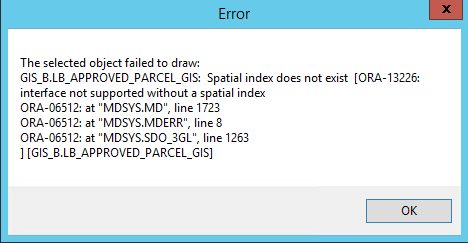
Sometimes when you move database schema from server to another server and try to open the spatial tables in ArcCataloge or ArcMap you will face the following error because the spatial index does not updated


To solve the error which is the same as in the previous screenshot follow the following


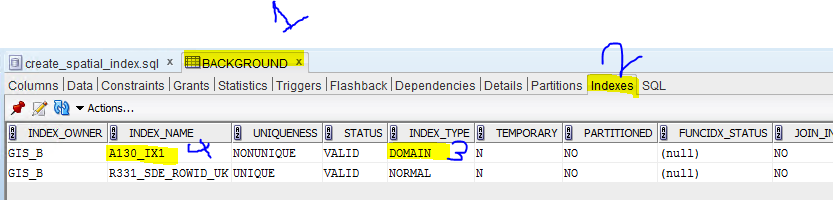
  1. Go the table in SQL developer if you use oracle
  2. Go to the indexes tab 
  3. find the domain index 
  4. get its name 
  5. Create script as the following and refresh you ArcCataloge database connection 


DROP indexName ;
CREATE INDEX theSameIndexName ON spatialTableName (geometryColumn) INDEXTYPE IS MDSYS.SPATIAL_INDEX;


Example:

DROP index A130_IX1 ;
CREATE INDEX A130_IX1 ON BACKGROUND (shape) INDEXTYPE IS MDSYS.SPATIAL_INDEX;


Tuesday, 14 October 2014

Disable click outside of bootstrap modal area to close modal

On Options chapter, in the page you linked, you can see the backdrop option. Passing this option with value 'static' will prevent closing the modal.
If you opening the modal by js(with jQuery in this example), use:
$('#myModal').modal({backdrop: 'static'})  
If you are using data attributes, use:

< button data-target="#myModal" data-toggle="modal" data-backdrop="static">
   Invoke Modal
 </ button>

Monday, 29 September 2014

Verify the GIS data

EXECUTE SDO_GEOM.VALIDATE_LAYER_WITH_CONTEXT('LB_BLOCKS_GIS','SHAPE','RANDOM_POINT_RESULTS',2);
--CALL SDO_GEOM.VALIDATE_LAYER_WITH_CONTEXT('LB_BUILDINGS_GIS','SHAPE','RANDOM_POINT_RESULTS');

select
  *
from
  LB_BLOCKS_GIS A, RANDOM_POINT_RESULTS B
where
  A.ROWID = B.SDO_ROWID;
 
  select * from RANDOM_POINT_RESULTS;


UPDATE user_sdo_geom_metadata
   SET diminfo = ( SELECT MDSYS.SDO_DIM_ARRAY(
                                MDSYS.SDO_DIM_ELEMENT('X', minx, maxx, 0.001),
                                MDSYS.SDO_DIM_ELEMENT('Y', miny, maxy, 0.001)) as diminfo
                     FROM ( SELECT TRUNC( MIN( v.x ) - 1,0) as minx,
                                   ROUND( MAX( v.x ) + 1,0) as maxx,
                                   TRUNC( MIN( v.y ) - 1,0) as miny,
                                   ROUND( MAX( v.y ) + 1,0) as maxy
                              FROM (SELECT SDO_AGGR_MBR(a.shape) as mbr
                                      FROM LB_QUARTERS_GIS a) b,
                                           TABLE(mdsys.sdo_util.getvertices(b.mbr)) v
                           )
                 )
 WHERE table_name = 'LB_ROADS_GIS_R';
 commit;
 
 
   delete from user_sdo_geom_metadata
   where table_name='LB_ROADS_GIS_R'
   ;
 
   --MDSYS.SDO_DIM_ARRAY(MDSYS.SDO_DIM_ELEMENT(NULL,152796.6044,154204.896,0.001),MDSYS.SDO_DIM_ELEMENT(NULL,100965.676000001,102023.5385,0.001))
   --MDSYS.SDO_DIM_ARRAY(MDSYS.SDO_DIM_ELEMENT('X',152795,154206,0.001),MDSYS.SDO_DIM_ELEMENT('Y',100964,102025,0.001))

Wednesday, 27 August 2014

Tuesday, 15 July 2014

Change DB collation


ALTER DATABASE [Ratification] SET SINGLE_USER WITH ROLLBACK IMMEDIATE;

GO

ALTER DATABASE [Ratification] COLLATE Arabic_CI_AS;

GO

ALTER DATABASE [Ratification] SET MULTI_USER;

GO

--[Ratification] IS THE db NAME

Wednesday, 28 May 2014

Oracle Commands


  • To connect from client use sqlplus and type (username/password@hostname/servicename(sid))
  • To list all tables names for the logged in user (select table_name from user_tables;)
  • To select cashed maps (select name from user_sdo_cached_maps;)

  • java.lang.OutOfMemoryError: Java heap space; It means Map builder requires more heap memory to load spatial data. To solve it.: Open the command line and start the Map Builder application as follows. java -jar -Xmx1024M D:\mapbuilder.jar


Sunday, 30 March 2014

Execute Huge SQL Script File through SQLCM


Run Command Prompt as Administrator and cd in the folder which contains the DB script file

sqlcmd -S ServerName -d dataBaseName -i scriptFile.sql -o outputFile.txt