Friday, 19 June 2026

Power BI Project Error Newtonsoft


Error Message:

Method not found: 'System.Threading.Tasks.Task`1<Newtonsoft.Json.Linq.JToken> Newtonsoft.Json.Linq.JToken.LoadAsync(Newtonsoft.Json.JsonReader, System.Threading.CancellationToken)'.


other error 

Error Message:

Cannot perform interop call to: CopilotSettingsHostService.GetAgentMetadataResponse(args:1) - wrong arg[0]=request value


The Solution:

  1. Download the new dll from https://globalcdn.nuget.org/packages/newtonsoft.json.13.0.3.nupkg?packageVersion=13.0.3
  2. Extract it after converting the extension into zip
  3. cop the Newtonsoft.Json.dll from folder .net 45
  4. Past it into new folder -name it as you want- in the directory C:\Windows\Microsoft.NET\assembly\GAC_MSIL\Newtonsoft.Json
  5. search in windows menu for "Developer Command Prompt" and run it as admin
  6. cd to the folder where you placed the dll
  7. run the following command: gacutil -i Newtonsoft.Json.dll
  8. restart power bi, and congrats 

Wednesday, 15 October 2025

Search in MSSQL objects

    -- To search in MSSQL programmable objects (stored procedures, functions, views, triggers)


CREATE PROCEDURE SearchInAllDatabaseObjects

    @SearchText NVARCHAR(255)
AS
BEGIN
    SET NOCOUNT ON;
   
    -- Search in programmable objects (stored procedures, functions, views, triggers)
    SELECT
        SCHEMA_NAME(o.schema_id) + '.' + o.name AS FullObjectName,
        CASE o.type
            WHEN 'P' THEN 'Stored Procedure'
            WHEN 'FN' THEN 'Scalar Function'
            WHEN 'IF' THEN 'Inline Table Function'
            WHEN 'TF' THEN 'Table Function'
            WHEN 'TR' THEN 'Trigger'
            WHEN 'V' THEN 'View'
        END AS ObjectType,
        o.type AS TypeCode,
        o.create_date AS CreatedDate,
        o.modify_date AS ModifiedDate
    FROM
        sys.sql_modules m
    INNER JOIN
        sys.objects o ON m.object_id = o.object_id
    WHERE
        m.definition LIKE '%' + @SearchText + '%'
        AND o.type IN ('P', 'FN', 'IF', 'TF', 'TR', 'V')
   
    UNION ALL
   
    -- Search in table/column names
    SELECT
        SCHEMA_NAME(t.schema_id) + '.' + t.name AS FullObjectName,
        CASE t.type
            WHEN 'U' THEN 'Table (User)'
            WHEN 'S' THEN 'Table (System)'
        END AS ObjectType,
        t.type AS TypeCode,
        t.create_date AS CreatedDate,
        t.modify_date AS ModifiedDate
    FROM
        sys.tables t
    WHERE
        t.name LIKE '%' + @SearchText + '%'
        OR EXISTS (
            SELECT 1
            FROM sys.columns c
            WHERE c.object_id = t.object_id
            AND c.name LIKE '%' + @SearchText + '%'
        )
   
    ORDER BY
        ObjectType, FullObjectName;
END
GO


To make it work for all databases as system stored procedure use the following script
  • System procedures must be in master and prefixed with sp_

  • sp_ms_marksystemobject only works if the procedure exists in master.

  • USE master;
    GO
    
    CREATE PROCEDURE sp_SearchInAllDatabaseObjects
        @SearchText NVARCHAR(255)
    AS
    BEGIN
        SET NOCOUNT ON;
    
        -- Search in programmable objects
        SELECT 
            SCHEMA_NAME(o.schema_id) + '.' + o.name AS FullObjectName,
            CASE o.type
                WHEN 'P' THEN 'Stored Procedure'
                WHEN 'FN' THEN 'Scalar Function'
                WHEN 'IF' THEN 'Inline Table Function'
                WHEN 'TF' THEN 'Table Function'
                WHEN 'TR' THEN 'Trigger'
                WHEN 'V' THEN 'View'
            END AS ObjectType,
            o.type AS TypeCode,
            o.create_date AS CreatedDate,
            o.modify_date AS ModifiedDate
        FROM sys.sql_modules m
        INNER JOIN sys.objects o ON m.object_id = o.object_id
        WHERE m.definition LIKE '%' + @SearchText + '%'
          AND o.type IN ('P','FN','IF','TF','TR','V')
    
        UNION ALL
    
        -- Search in tables/columns
        SELECT 
            SCHEMA_NAME(t.schema_id) + '.' + t.name AS FullObjectName,
            CASE t.type
                WHEN 'U' THEN 'Table (User)'
                WHEN 'S' THEN 'Table (System)'
            END AS ObjectType,
            t.type AS TypeCode,
            t.create_date AS CreatedDate,
            t.modify_date AS ModifiedDate
        FROM sys.tables t
        WHERE t.name LIKE '%' + @SearchText + '%'
           OR EXISTS (
                SELECT 1 
                FROM sys.columns c 
                WHERE c.object_id = t.object_id 
                  AND c.name LIKE '%' + @SearchText + '%'
            )
        ORDER BY ObjectType, FullObjectName;
    END;
    GO
    EXEC sp_ms_marksystemobject 'sp_SearchInAllDatabaseObjects';
    
    
    -- Example usage:
    -- EXEC sp_SearchInAllDatabaseObjects 'YourSearchTextHere';
    

    Thursday, 14 November 2024

    to shrink all databases on your server

    DECLARE @DB_Name NVARCHAR(255);

    DECLARE @DB_LgoFileName NVARCHAR(255);

    DECLARE @ScriptsList NVARCHAR(max);


    DECLARE db_cursor CURSOR FOR

    SELECT name

    FROM sys.databases

    WHERE  state_desc = 'ONLINE' and name NOT IN ('master', 'model', 'msdb', 'tempdb'); -- Exclude system databases


    OPEN db_cursor;

    FETCH NEXT FROM db_cursor INTO @DB_Name;


    WHILE @@FETCH_STATUS = 0

    BEGIN

        SET @DB_LgoFileName = (SELECT name FROM sys.master_files WHERE type_desc = 'LOG' AND database_id = DB_ID(@DB_Name));

    set @DB_LgoFileName='['+@DB_LgoFileName+']';

    set @DB_Name='['+@DB_Name+']';

    print '@DB_Name: '+ @DB_Name;

    print '@DB_LgoFileName: '+ @DB_LgoFileName;


    set @ScriptsList= 'USE ' + @DB_Name + ';';


        -- Shrink the log file

        set @ScriptsList=@ScriptsList+' ' +('DBCC SHRINKFILE (' + @DB_LgoFileName + ', 1);');


        -- Shrink the database

        set @ScriptsList=@ScriptsList+' '+('DBCC SHRINKDATABASE (' + @DB_Name + ');');


        -- Set recovery model to SIMPLE

        set @ScriptsList=@ScriptsList+' '+('ALTER DATABASE ' + @DB_Name + ' SET RECOVERY SIMPLE;');


        -- Shrink the log file again

        set @ScriptsList=@ScriptsList+' '+('DBCC SHRINKFILE (' + @DB_LgoFileName + ', 1);');


        -- Set recovery model back to FULL

        set @ScriptsList=@ScriptsList+' '+('ALTER DATABASE ' + @DB_Name + ' SET RECOVERY FULL;');

    EXEC(@ScriptsList);

        FETCH NEXT FROM db_cursor INTO @DB_Name;

    END


    CLOSE db_cursor;

    DEALLOCATE db_cursor;


    Tuesday, 13 February 2024

    Entity framework scaffolding oracle database first

    First:

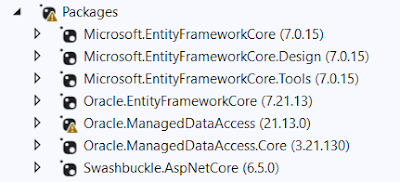
    install the following packages, be careful of package version. 


    Second:

    open package manger and run the following command after you update with yours

    Scaffold-DbContext "Data Source=serverip/sid;Persist Security Info=True;User ID=un;Password=pw;Connection Timeout=0" Oracle.EntityFrameworkCore -OutputDir Model -Context "ContextName" -Tables  table1, table2....,tablen

    If you didn't list the tables names this command will generate for all db objects 


    Monday, 23 October 2023

    Enable Disable Identity Field to migrate data

    CREATE TABLE [dbo].[AnIdentityTable](

           [Id] [int] IDENTITY(1,1) NOT NULL,

           [_Name] [nvarchar](50) NOT NULL,

     CONSTRAINT [PK_AnIdentityTable] PRIMARY KEY CLUSTERED

    (

           [Id] ASC

    )WITH (PAD_INDEX = OFF, STATISTICS_NORECOMPUTE = OFF, IGNORE_DUP_KEY = OFF, ALLOW_ROW_LOCKS = ON, ALLOW_PAGE_LOCKS = ON, OPTIMIZE_FOR_SEQUENTIAL_KEY = OFF) ON [PRIMARY]

    ) ON [PRIMARY]

    GO


    -- Enable insert values in the Identity Field

    SET IDENTITY_INSERT [dbo].[AnIdentityTable] ON;


    INSERT INTO [dbo].[AnIdentityTable] (Id, _Name)

    VALUES (5, 'Some Value');


    -- Disable insert values in the Identity Field, after disabling it starts frm the max value

    SET IDENTITY_INSERT [dbo].[AnIdentityTable] OFF; 

    Monday, 9 October 2023

    Python to MSSQL

     import pandas as pd

    import pyodbc
    from sqlalchemy import create_engine # pip install SQLAlchemy
    from sqlalchemy.engine import URL
    import pypyodbc # pip install pypyodbc

    # Database connection settings
    server = 'serverName'
    database = 'DB_Name'
    username = 'un'
    password = 'pw'


    from sqlalchemy.types import (
        Boolean,
        Date,
        DateTime,
        Float,
        Integer,
        SmallInteger,
        String,
        Unicode,
        BigInteger,
    )
    def get_sqlalchemy_types(df_types):
        # dictionary mapping pandas dtypes to SQLAlchemy types
        dtype_to_sqlalchemy_type = {
            # 'int64': BigInteger,
            # 'float64': Float,
            'object': Unicode(length=255),
            # 'datetime64[ns]': DateTime
        }    
        # create an empty dictionary to store column names and SQLAlchemy types
        col_dict = {}    
        # loop through columns and add name and type to dictionary
        for col in df_types.columns:
            col_dtype = str(df_types[col].dtype)
            if col_dtype in dtype_to_sqlalchemy_type.keys():
                sqlalchemy_type = dtype_to_sqlalchemy_type[col_dtype]
                col_dict[col] = sqlalchemy_type
       
        return col_dict

    conn_str = f'DRIVER={{ODBC Driver 17 for SQL Server}};SERVER={server};
                    DATABASE={database};UID={username};PWD={password}'

    conn = pyodbc.connect(conn_str)
    connection_url = URL.create('mssql+pyodbc', query={'odbc_connect': conn_str})
    enigne = create_engine(connection_url, module=pypyodbc)
    result.to_sql('tablename', enigne, if_exists='append', index=False, schema='dbo',
    dtype=get_sqlalchemy_types(result),
    chunksize=100)
    conn.close()

    Wednesday, 4 October 2023

    Sunday, 7 May 2023

    MSSQL split column values by delimiter and get the last value


    SELECT BQCODE, REVERSE(LEFT(REVERSE(BQCODE), CHARINDEX('/', REVERSE(BQCODE)) - 1))

    FROM [jordan_settelement_pacels]

    Connect Devexpress Dashboard to SQL datasource and Run Custom queries

     Add the following code in the page load function to allow the devexpress dashboard connect to database and to create custome queries 


    protected void Page_Load(object sender, EventArgs e) {

                DashboardFileStorage dashboardFileStorage = new DashboardFileStorage("~/App_Data/Dashboards");

                ASPxDashboard1.SetDashboardStorage(dashboardFileStorage);


                // Uncomment this string to allow end users to create new data sources based on predefined connection strings.

                ASPxDashboard1.SetConnectionStringsProvider(new DevExpress.DataAccess.Web.ConfigFileConnectionStringsProvider());


                DataSourceInMemoryStorage dataSourceStorage = new DataSourceInMemoryStorage();


                // Registers an SQL data source.

                //DashboardSqlDataSource sqlDataSource = new DashboardSqlDataSource("SQL Data Source", "NWindConnectionString");

                //SelectQuery query = SelectQueryFluentBuilder

                //    .AddTable("SalesPerson")

                //    .SelectAllColumnsFromTable()

                //    .Build("Sales Person");

                //sqlDataSource.Queries.Add(query);

                //dataSourceStorage.RegisterDataSource("sqlDataSource", sqlDataSource.SaveToXml());


                // Registers an Object data source.

                DashboardObjectDataSource objDataSource = new DashboardObjectDataSource("Object Data Source");

                objDataSource.DataId = "Object Data Source Data Id";

                dataSourceStorage.RegisterDataSource("objDataSource", objDataSource.SaveToXml());


                // Registers an Excel data source.

                DashboardExcelDataSource excelDataSource = new DashboardExcelDataSource("Excel Data Source");

                excelDataSource.ConnectionName = "Excel Data Source Connection Name";

                excelDataSource.SourceOptions = new ExcelSourceOptions(new ExcelWorksheetSettings("Sheet1"));

                dataSourceStorage.RegisterDataSource("excelDataSource", excelDataSource.SaveToXml());


                ASPxDashboard1.SetDataSourceStorage(dataSourceStorage);

                ASPxDashboard1.EnableCustomSql = true;

                ASPxDashboard1.EnableJsonDataSource = true;

                ASPxDashboard1.EnableTextBoxItemEditor = true;

                ASPxDashboard1.AllowExecutingCustomSql= true;

                ASPxDashboard1.AllowCreateNewDashboard = true;

                ASPxDashboard1.AllowCreateNewDashboard = true;

                ASPxDashboard1.AllowCreateNewJsonConnection = true;

                ASPxDashboard1.AllowExportDashboard = true;

                ASPxDashboard1.AllowExportDashboardItems = true;

                ASPxDashboard1.AllowInspectAggregatedData = true;

                ASPxDashboard1.AllowInspectRawData = true;

                ASPxDashboard1.AllowMaximizeItems = true;

                ASPxDashboard1.AllowOpenDashboard = true;

                ASPxDashboard1.AllowReadUnlistedColumnsFromClientApi = true;


            }


            protected void DataLoading(object sender, DataLoadingWebEventArgs e) {

                if(e.DataId == "Object Data Source Data Id") {

                    e.Data = Invoices.CreateData();

                }

            }


            protected void ConfigureDataConnection(object sender, ConfigureDataConnectionWebEventArgs e) {

                if(e.ConnectionName == "Excel Data Source Connection Name") {

                    ExcelDataSourceConnectionParameters excelParameters = (ExcelDataSourceConnectionParameters)e.ConnectionParameters;

                    excelParameters.FileName = HostingEnvironment.MapPath(@"~/App_Data/Sales.xlsx");

                }

            }


    Prevent the parent hosted web application on IIS from forwarding the configuration to its children

    surround the tag or group of tags you want to prevent it from forwarding by the following tag

    <location path="." inheritInChildApplications="false">
    ......

    </location>

    Tuesday, 18 April 2023

    Multiple parameters in a select statement and exclude it if it is null

    SELECT *

      FROM AdminUnitTemplates aut

      WHERE ID = COALESCE(@ID, ID)

        AND TempName = COALESCE(@TempName, TempName)

        AND Title = COALESCE(@Title, Title)

           AND AdminUnitID = COALESCE(@AdminUnitID, AdminUnitID)


    Using the previous query, you can skip using if statements to generate the query. 

    Thursday, 16 March 2023

    How to download files from Slide share

     1. Go to the slideshare and inspect the source and get the link and use the following code in python 

    import urllib.request

    # URL of the image to be downloaded
    # Loop over a range of numbers with a different starting and ending value
    for i in range(1, 311):
       url = 'https://image.slidesharecdn.com/an14v1consar-160210214304/75/annex-14-icao-arabic-version-'+str(i)+'-2048.jpg'
       filename = str(i)+'.jpg'
       urllib.request.urlretrieve(url, filename)


    Convert the images to pdf using the following code 


    from reportlab.lib.pagesizes import letter
    from reportlab.pdfgen import canvas
    from PIL import Image

    # List of image filenames to combine
    image_files =[]
    for i in range(1, 311):
       image_files.append(str(i)+'.jpg')

    # Create a new PDF file
    pdf_file = canvas.Canvas('images.pdf', pagesize=letter)


    # Loop over the image files and add them to the PDF
    for image_file in image_files:
        # Open the image file using PIL
        image = Image.open(image_file)

        # Calculate the aspect ratio of the image
        width, height = image.size
        aspect_ratio = height / width

        # Add the image to the PDF
        pdf_file.setPageSize((letter[0], letter[0] * aspect_ratio))
        pdf_file.drawImage(image_file, 0, 0, letter[0], letter[0] * aspect_ratio)

        # Add a new page to the PDF for the next image
        pdf_file.showPage()

    # Save the PDF file
    pdf_file.save()